
Access links
An access link is how people join a company space without being invited one at a time. You create a link, attach the plans new arrivals should land in, and send it out. Anyone who opens it registers straight into the space.
The screen
Section titled “The screen”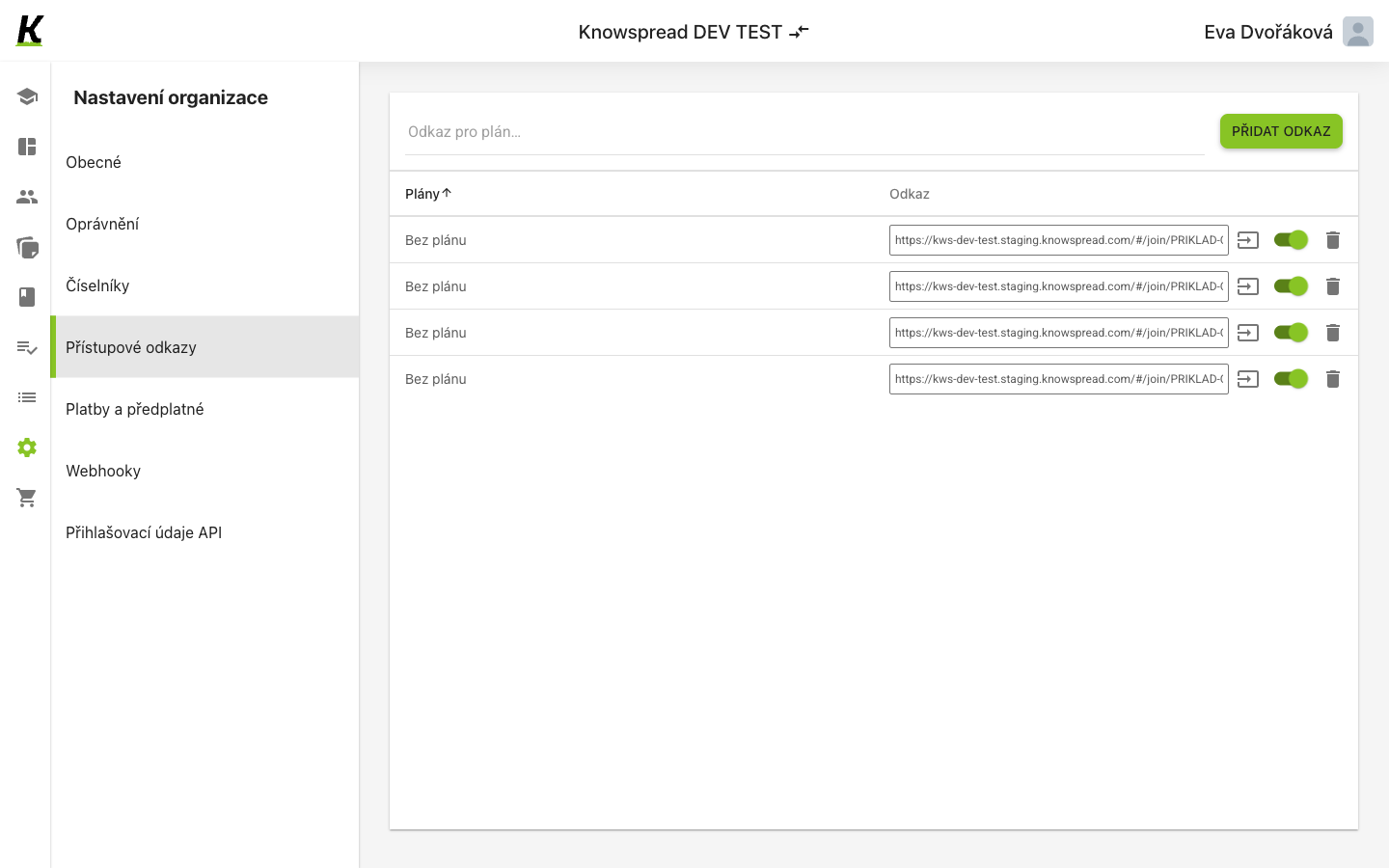
- Přístupové odkazy is the fourth entry in organisation settings (1).
- Creating one is a single step, not a dialog: name the plans in the field and select Přidat odkaz (2). A link with no plan attached shows as Bez plánu.
- Each row carries the link itself (3), then a copy action, a switch that turns the link on or off, and a delete action.
Treat each link as a credential
Section titled “Treat each link as a credential”The link is the whole authorisation. It carries a token, and anyone holding it joins the organisation — no invitation, no approval step.
The switch on each row is what makes a link revocable. Turning it off leaves the row in place, so a link that has spread further than intended can be closed without losing the record of it.
What to watch for
Section titled “What to watch for”In a personal space this screen refuses instead of working, and it
shows the refusal as Nenalezen žádný přístupový odkaz — an empty state rather
than an error. The list is not empty; GET /api/v1/company_spaces/invitation_links
answered 403. API credentials behaves the same way.