
Writing a course
Content does not have to be bought. This journey makes a course from nothing, and the useful part is not the editor — it is that Knowspread keeps a running list of what is still wrong with your draft and links to each item.
1. Choose what you are making
Section titled “1. Choose what you are making”PŘIDAT OBSAH in Obsah opens Vytvořit nový obsah. The first field decides more than it looks like it does.
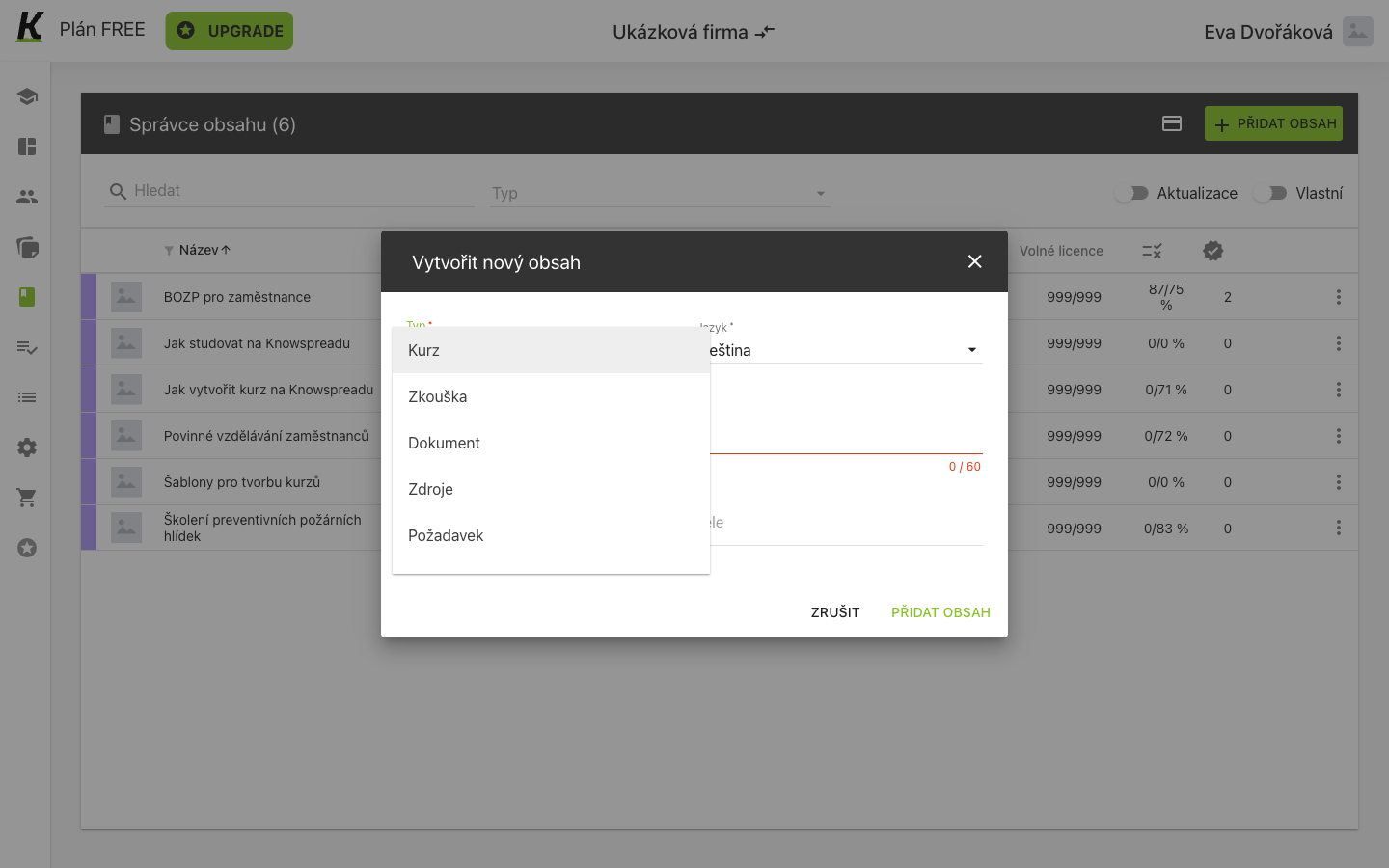
- Typ is a choice between seven things (1), and the list scrolls: Kurz, Zkouška, Dokument, Zdroje, Požadavek, Osvědčení and Blended Learning.
The type cannot be changed afterwards — the overview shows it as a value, not a field. A document that should have been a course is a new piece of content, not an edit.
2. Name it and say who may edit it
Section titled “2. Name it and say who may edit it”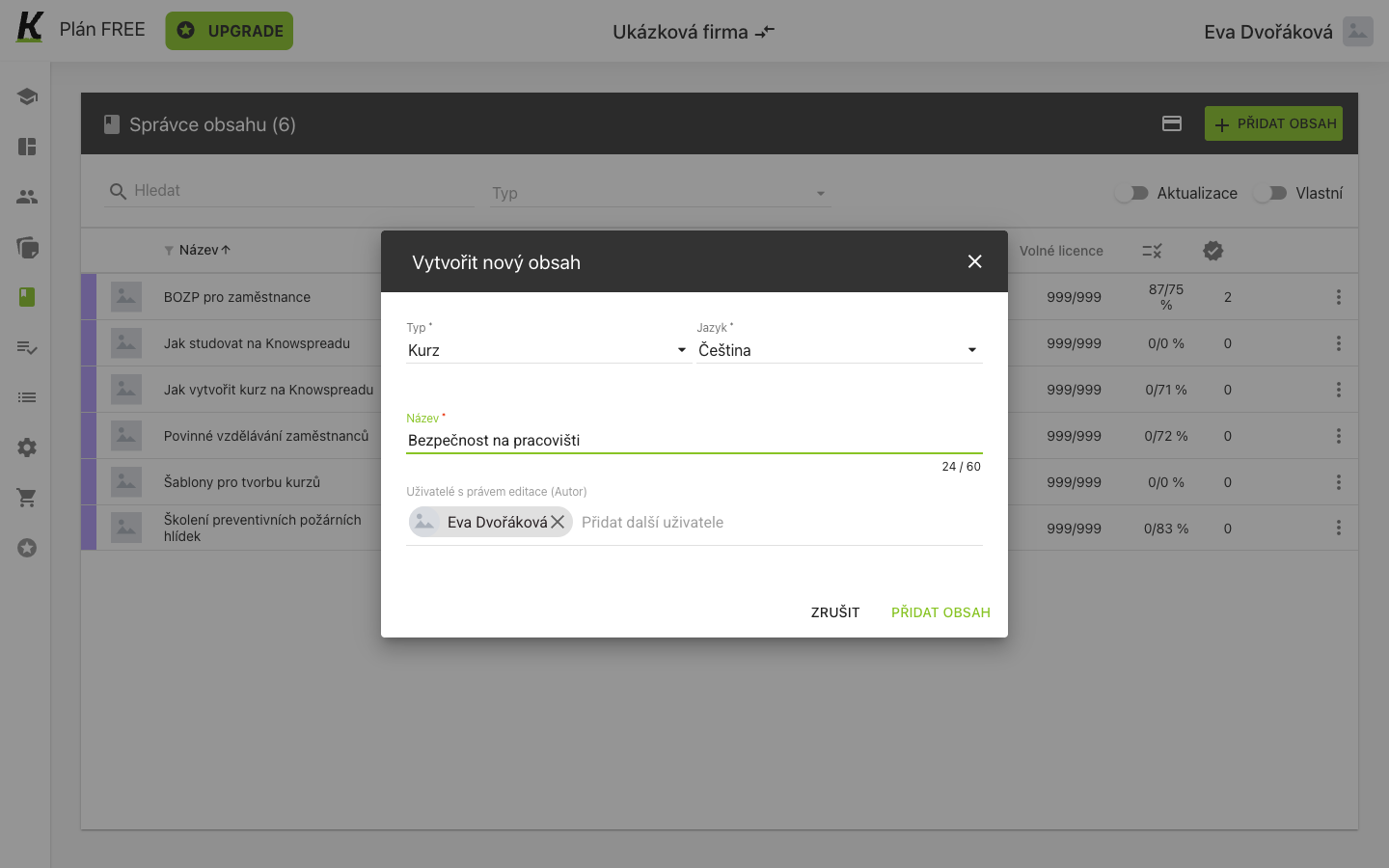
- Typ now reads Kurz (1). Jazyk beside it offers Czech, English and Polish, and defaults to the space’s language.
- Název is capped at 60 characters, with a counter (2).
- Uživatelé s právem editace (Autor) arrives with you already in it (3). Adding somebody here gives them edit rights on this course alone — it is not a role in the space.
- PŘIDAT OBSAH becomes active once type and name are both set (4).
3. Land on a draft that already knows what is missing
Section titled “3. Land on a draft that already knows what is missing”Creating content does not open the editor. It opens the content’s own page, and the whole publishing path is on one bar from the first second.
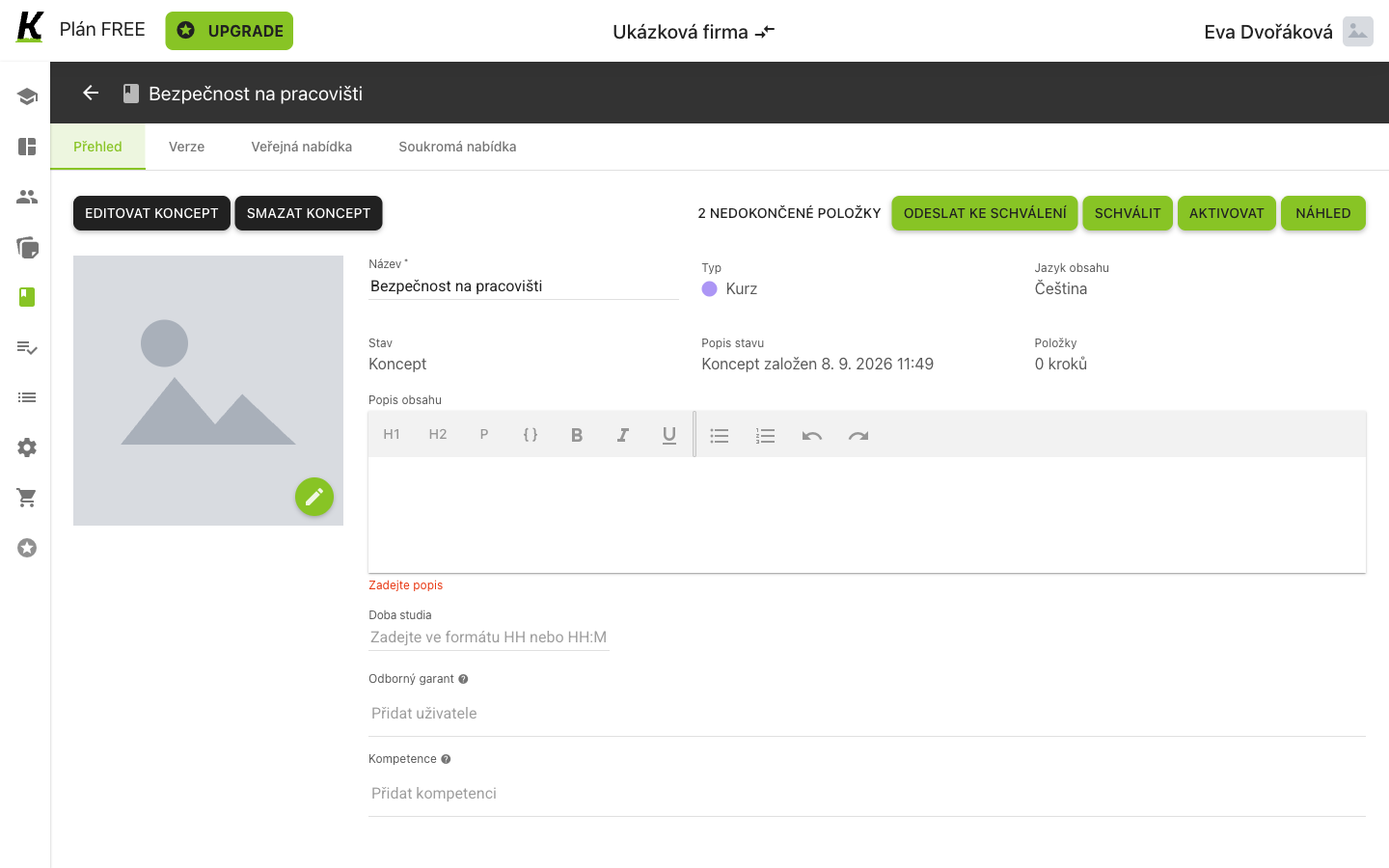
- Stav is Koncept (1), and Popis stavu beside it records the minute the draft was founded.
- Položky reads 0 kroků (2) — nothing has been written yet.
- 2 NEDOKONČENÉ POLOŽKY is not a label but a link (3): it opens the editor at the problems. When they are all resolved it reads Vše dokončeno.
- EDITOVAT KONCEPT is the other way in (4). SMAZAT KONCEPT beside it discards the draft rather than the course.
The four tabs — Přehled, Verze, Veřejná nabídka, Soukromá nabídka — separate what the content is from which versions exist and who may buy it. Only the first is useful while it is a draft.
The required description is flagged in red under the empty editor before you have tried anything. The form does not wait to be submitted.
4. Build the structure
Section titled “4. Build the structure”The editor puts the shape of the course on the left and everything about the course itself in the middle.
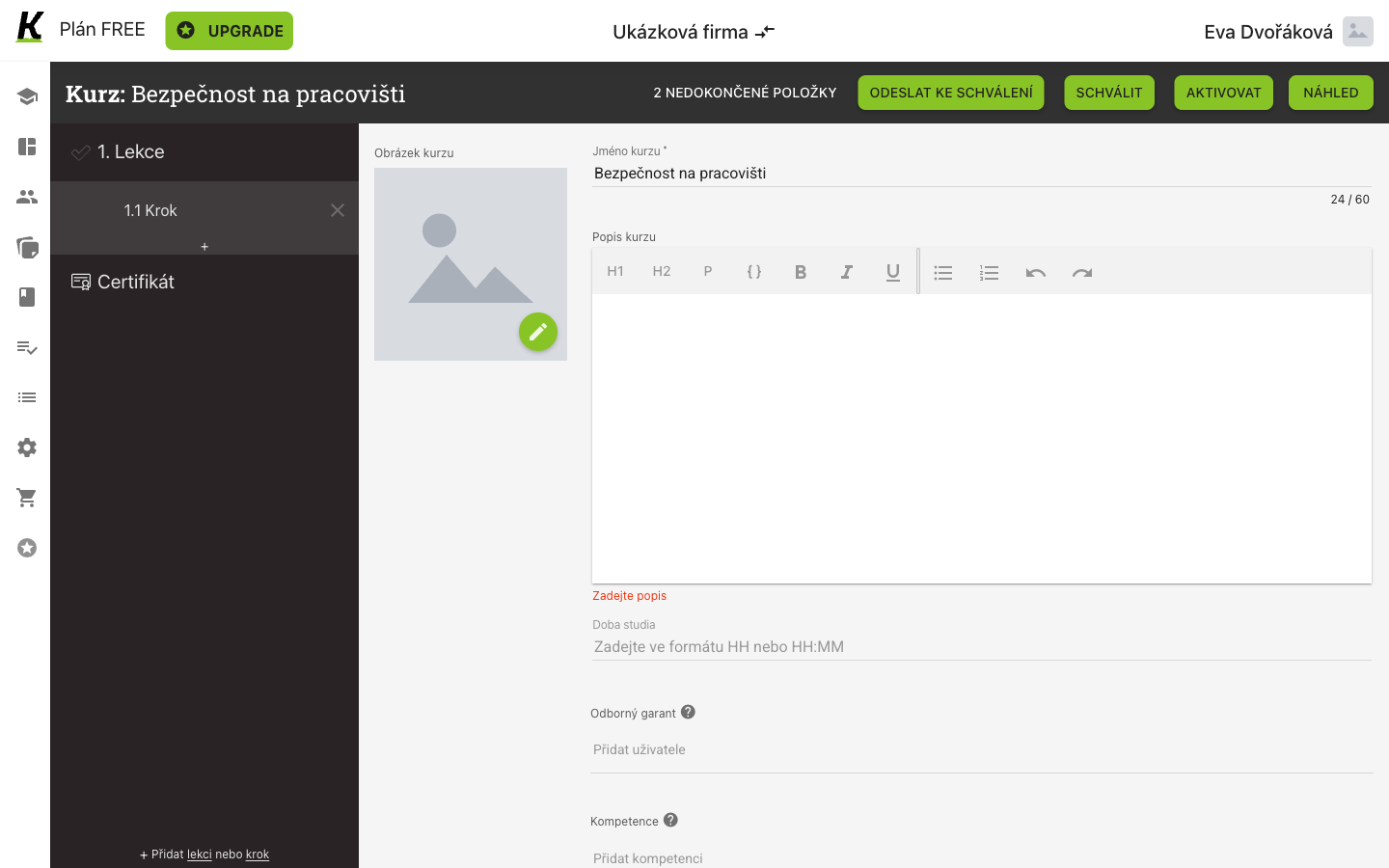
- A new course is not empty (1): it arrives with 1. Lekce, 1.1 Krok and Certifikát — a lesson, a step inside it, and the certificate the course ends with.
- The row’s controls appear when you point at it (2): a thin + strip inserts a lesson or step at that position, and an × on the hovered row removes it. At the foot of the column, + Přidat lekci nebo krok does the same without aiming.
- The publishing path is on the bar the whole time (3): ODESLAT KE SCHVÁLENÍ, SCHVÁLIT, AKTIVOVAT, NÁHLED.
Lessons and steps are numbered for you — 1., then 1.1 inside it.
Inserting between rows renumbers what follows.
5. Read what is still missing
Section titled “5. Read what is still missing”Scrolling the editor down reaches the list the bar has been counting.
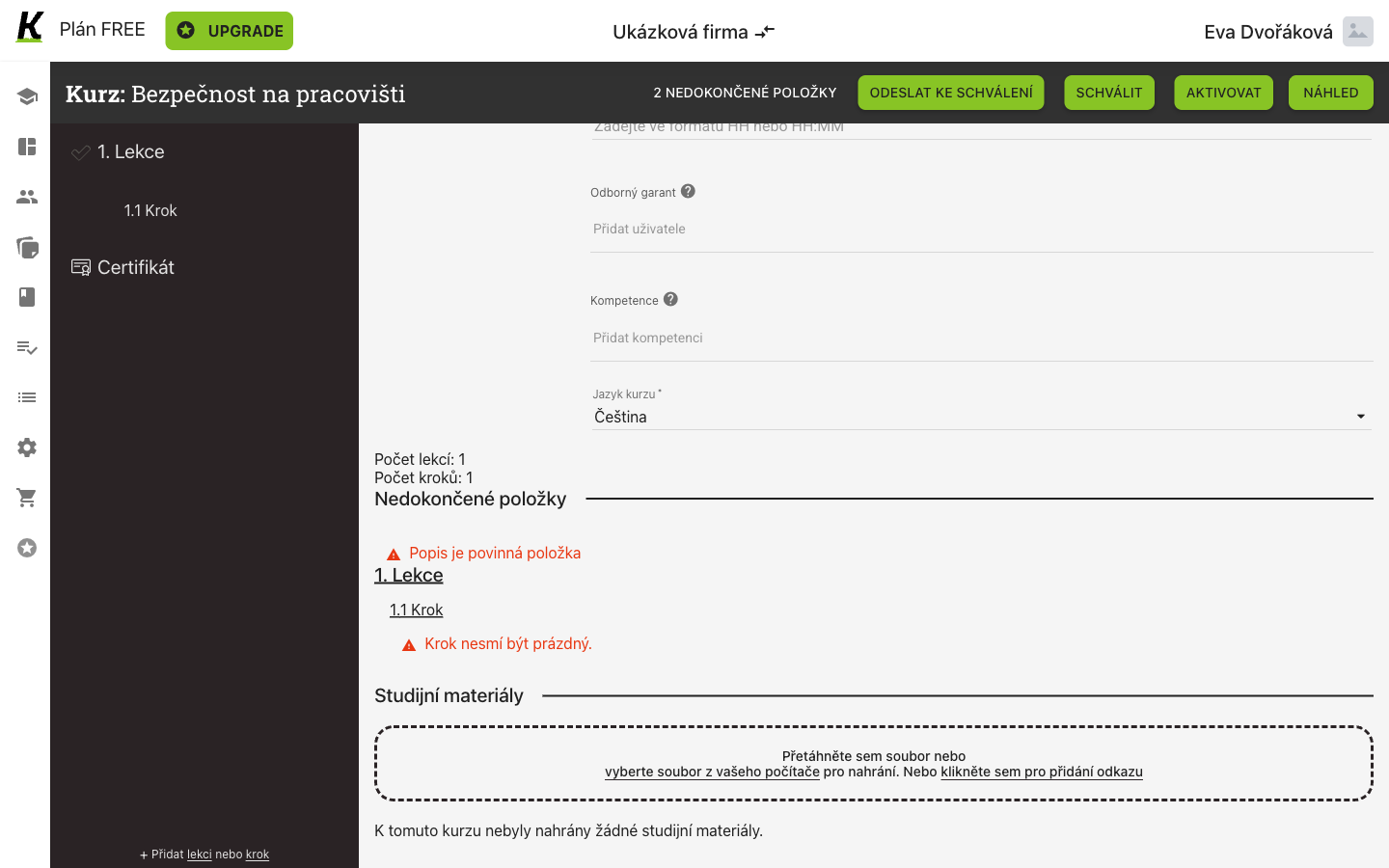
- Počet lekcí and Počet kroků count what exists (1).
- Popis je povinná položka is the first problem (2) — the course-level description from step 3.
- Krok nesmí být prázdný is the second (3), listed under the lesson and step it belongs to, both of them links.
Studijní materiály below the list takes files by drag or by picking them, and can hold a link instead. It is separate from the steps: a material is available throughout the course rather than at one point in it.
6. Put something inside the step
Section titled “6. Put something inside the step”The step’s own page is where the teaching goes, and its first question is what kind of thing this step is.
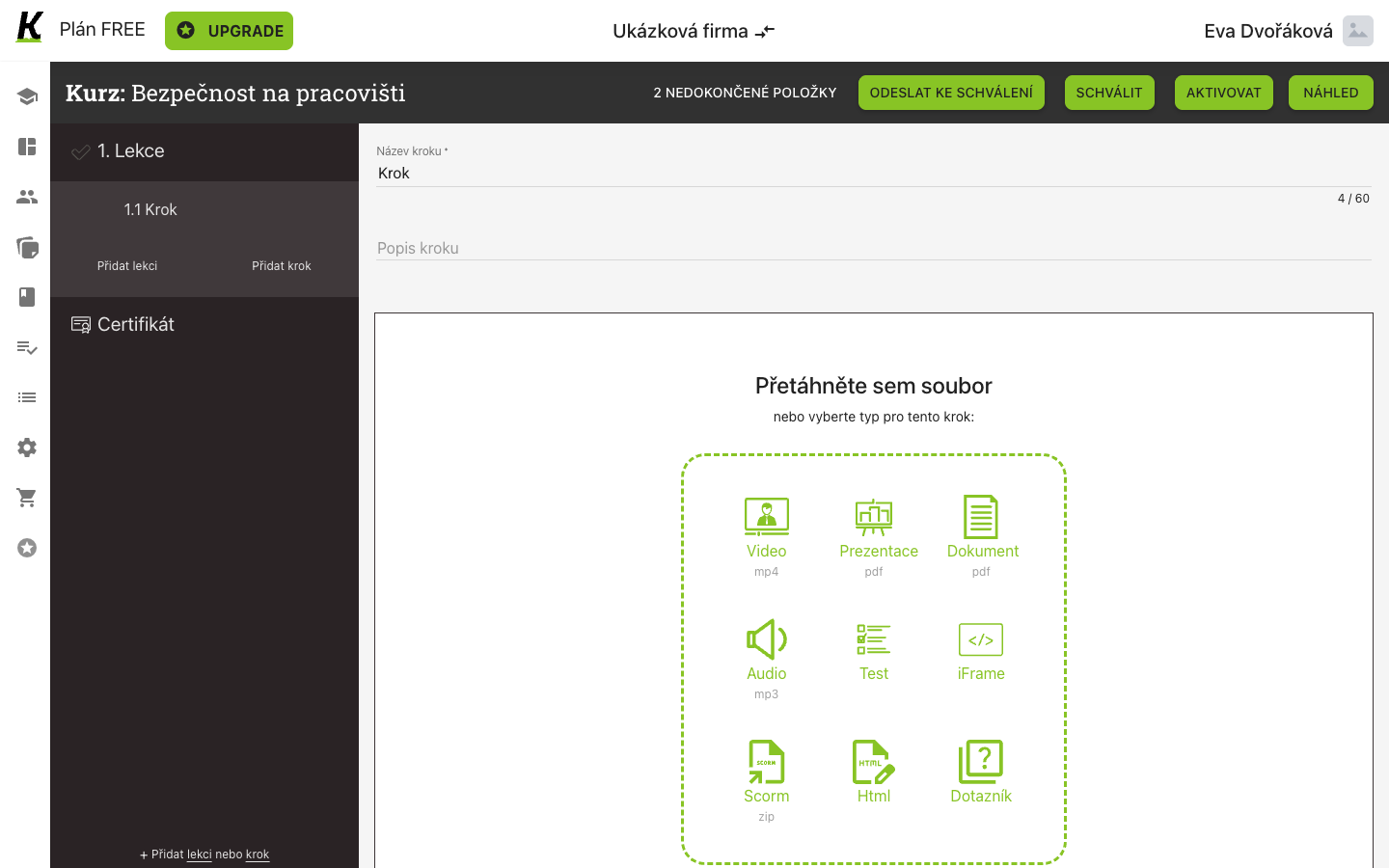
- Název kroku is what the learner sees in the course’s contents (1), capped at 60 characters like the course’s own name.
- Popis kroku is one line under it (2).
- Nine kinds of payload (3): Video, Prezentace, Dokument, Audio, Test, iFrame, Scorm, Html and Dotazník — or drag a file onto the area and let the kind follow from it.
Html is the one kind you author in place; the rest expect a file, an address or a set of questions. Choosing it turns the area into a rich-text editor with a live preview beside it.
Studijní materiály exists twice — once on the course and once on each step. A material on the course is available throughout it; a material on the step belongs to that point in it.
PŘIDAT SEKUNDÁRNÍ OBSAH adds a second payload to the same step, so a video and a document can sit together without becoming two steps.
Where this leaves you
Section titled “Where this leaves you”A course in draft whose structure is complete and whose step has something in it. The content list shows it alongside the bought courses, with no active version yet.
Next: publishing a version, so somebody can be assigned it. For the content list itself, see content; for the approvals screen, see approvals.