
Following completion
You assigned a plan and somebody studied. This is where you find out — and it is the same table you added them in.
When this is for you
Section titled “When this is for you”Assigning training is half the job. The other half is knowing who actually finished it — and that is usually needed by someone other than the person who built the plan: HR, a shift lead, an auditor. The answer is in the plan’s table on the Uživatelé tab, one row per person.
- New hires had to finish the training by the end of probation. HR opens the plan and reads the rows: Dokončené 1 is done, Ke studiu 1 is not yet. Nobody has to ask each person or collect confirmations.
- Somebody has not started because they never joined the space. Their row is greyed and carries an envelope. The problem is the invitation, not the course — and you know whom to remind to sign in rather than to study.
- A new compulsory plan includes people who have already taken the course. Whoever completed it earlier in another plan shows Dokončené 1 on the day the plan is created. You do not make them take it again, and you do not report a fault, because it is not one.
The Dokončené column says the person reached the end of the content — not that they declared they did it themselves. A completion date or a certificate is not here; the learner’s own side carries both.
Read the row
Section titled “Read the row”Open Studijní plány, select the plan, and stay on Uživatelé.
Three columns carry the answer.
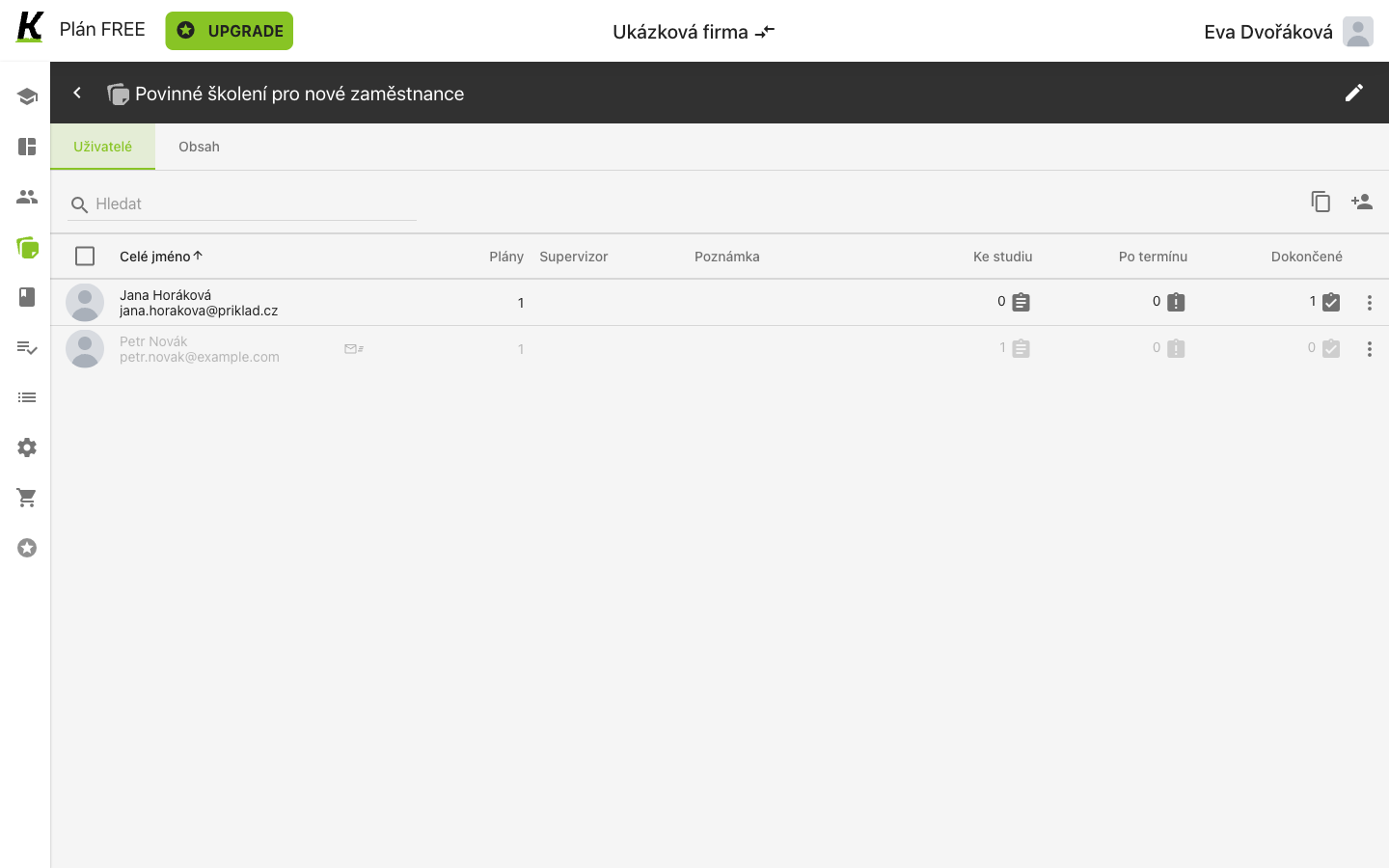
- (1) Ke studiu counts what is still waiting.
- (2) Po termínu counts what is late. It reads 0 for both people here, because this assignment carries no deadline — see building a plan for where a deadline is set.
- (3) Dokončené counts what is done.
The same screenshot, read by row rather than by column, is the answer about people:
- (1) The person who finished: Ke studiu 0, Dokončené 1.
- (2) The person who has not: Ke studiu 1, Dokončené 0. This row is also greyed with an envelope marker, because they were invited and have not joined.
The counters move together: finishing the course took Ke studiu from 1 to 0 and Dokončené from 0 to 1 for that person, with nothing else touched.
This was read while the learner’s personal declaration was still unanswered. The completion shows here regardless — so the number in this column means “reached the end of the content”, not “declared they did it themselves”.
Where this leaves you
Section titled “Where this leaves you”One table tells you, per person, what is waiting, what is late and what is done for this plan’s content.
A completion earned before the plan existed still counts here. Assigning a course to somebody who has already finished it creates no new work: on 2026-09-09 a plan made after this course was completed showed the same person as Ke studiu 0 / Dokončené 1 on the day it was created, and their learner side gained nothing. So a fresh compulsory-training plan can open with people already done — that is the product remembering, not a fault.
Next: building a quiz, which adds a test to the course these journeys wrote — and needs a new version to do it. For the plan screen as a reference, see study plans.