
User details and sign-in rules
The lower half of general settings decides what a person has to tell you before they can use the space, and what happens when they sign in.
The screen
Section titled “The screen”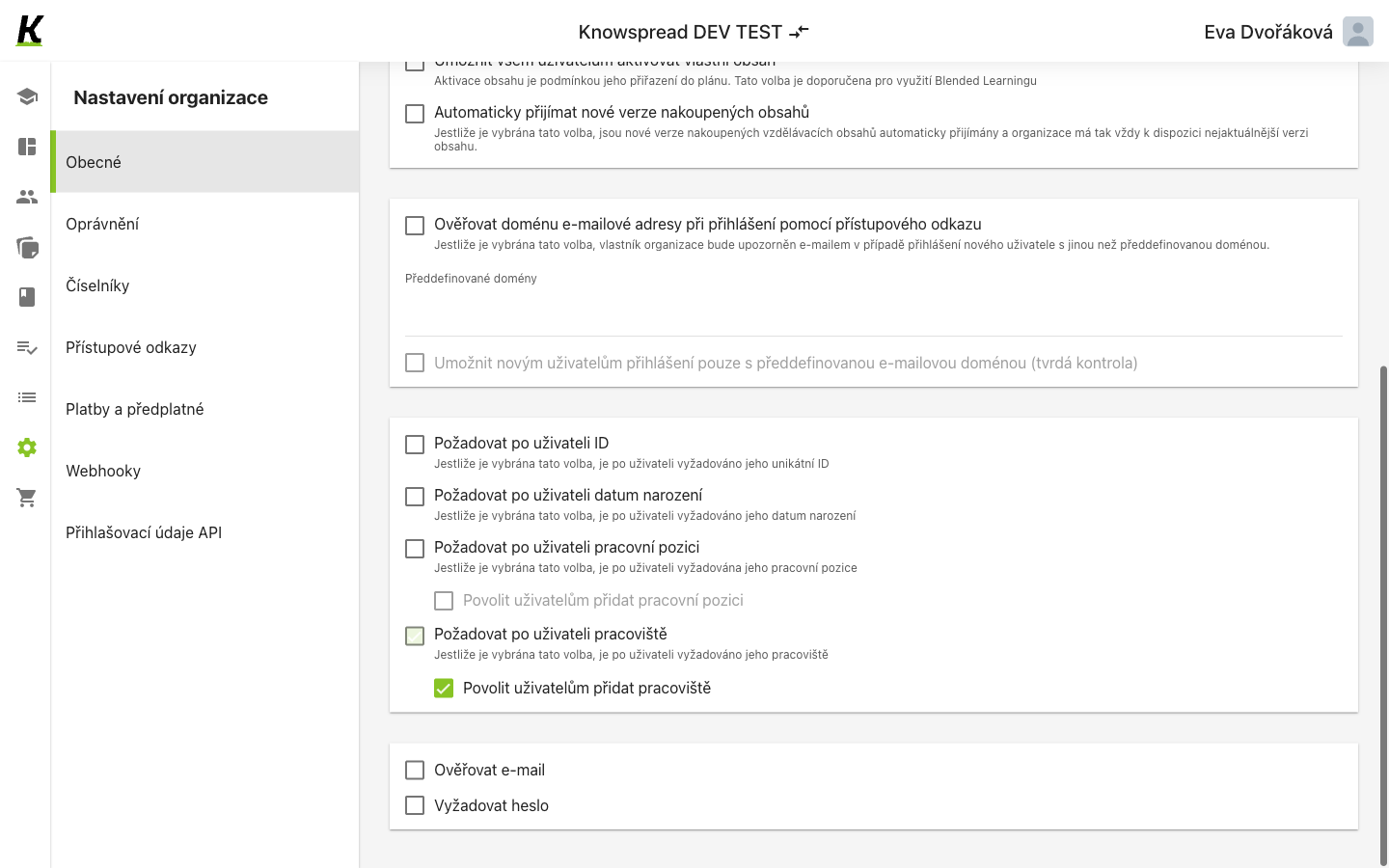
- Required details — ID, date of birth, job title, site (1). Each one you switch on becomes a field the person must fill in, and the values come from code lists.
- Under an unchecked requirement, the indented switch is greyed (2).
- Under a checked one, the same switch is live (3). The two appear side by side here, which is the whole dependency in one screen.
Switches that depend on other switches
Section titled “Switches that depend on other switches”Povolit uživatelům přidat pracovní pozici is bound to
ng-disabled="!general.mandatory_params.job_title", so it only becomes
available once Požadovat po uživateli pracovní pozici is on. Povolit
uživatelům přidat pracoviště works the same way against
mandatory_params.department — and because that requirement is on in this
space, its child is live.
Requiring a detail and letting people add their own value are separate decisions. The first says the field must be filled; the second says a person may extend the code list rather than only pick from it.
The hard domain check is bound to !general.domain_check, so it only
opens once domain checking itself is on. It stays greyed here.