
General settings
This is the first screen under organisation settings and the one that shapes everything else: what the space is called, where it lives, what language new people get, and how much its users are trusted to do on their own.
The screen
Section titled “The screen”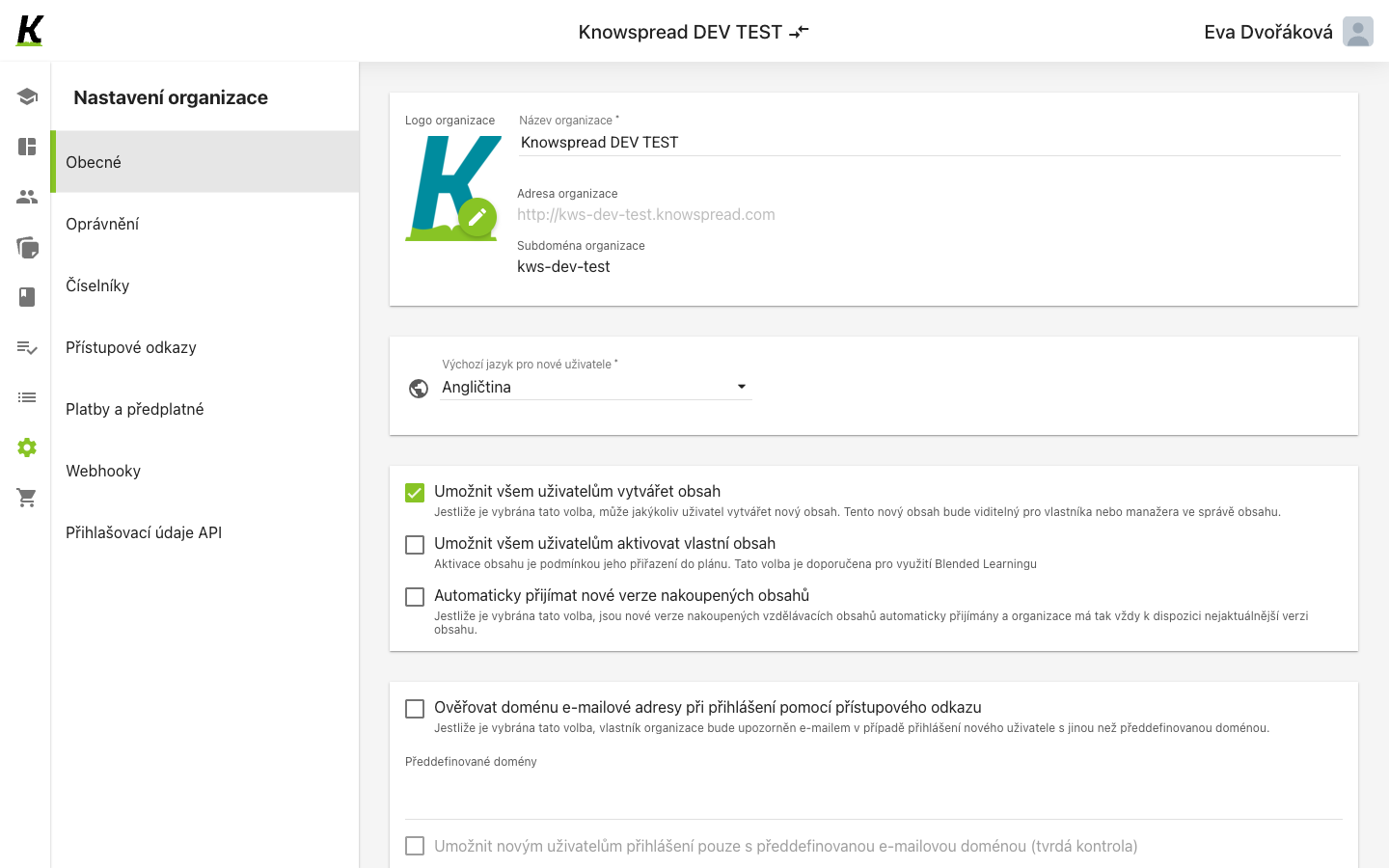
123
- Obecné is the first entry in organisation settings (1).
- Identity sits at the top: logo, name, address and subdomain (2). The
subdomain is the part that fills the address —
kws-dev-testgiveskws-dev-test.knowspread.com— so it is how people reach the space at all. - Below it are the switches that decide what users may do on their own: creating content, activating it, accepting new versions of purchased content (3).
Who may change what
Section titled “Who may change what”Three of these switches carry the note Pouze vlastník organizace smí provést změnu. In a company space, signed in as the owner, all three are live and the space name is editable.
Exactly one checkbox on this screen stays disabled — the hard domain check — and it is disabled for a different reason: it waits on the switch above it. User details and sign-in rules covers that dependency.
What to watch for
Section titled “What to watch for”The three switches are bound to ng-disabled="general.userIsManager",
so the gate really is the viewer’s role, exactly as their note says.